
Learn how to complete your ABHA card download at home with this step-by-step guide. Understand registration, downloading, benefits, and privacy controls.
Step by Step Guide to Complete Your ABHA Card Download at Home
The Ayushman Bharat Health Account, universally known as the abha card, is India’s foundational digital health identity, a unique 14-digit health ID that allows citizens to create, store, and share their medical records digitally across hospitals, clinics, diagnostic centres, and insurance providers throughout the country. As India’s digital health ecosystem under the Ayushman Bharat Digital Mission continues to expand, having your abha card download completed and ready before you need it, rather than scrambling to create one during a medical emergency, has become an increasingly important piece of personal health administration. This guide walks through the entire process step by step.
What the ABHA Card Actually Is
The abha card functions as a digital health locker key, a unique identification number linked to your health records that allows participating healthcare providers to access your medical history with your consent, eliminating the need to carry physical files, repeat diagnostic tests unnecessarily, or rely on memory when describing past treatments to a new doctor. The card itself, once generated, contains your unique health ID along with basic demographic information, and serves as the access point to a growing digital health record system that can include prescriptions, diagnostic reports, discharge summaries, and immunisation records, depending on how actively you and your healthcare providers populate your linked health record repository.
Why Completing Your ABHA Card Download Matters Now
India’s healthcare system is progressively integrating ABHA-linked digital records into standard hospital registration and insurance claim processes. Many hospitals, particularly those empanelled under government health schemes, now request or encourage ABHA ID creation at the registration desk. Health insurance companies are also increasingly building ABHA integration into their digital claims processes, since a verified digital health record can streamline claim documentation and reduce disputes around medical history disclosure. Completing your abha card download in advance, during a calm moment rather than during a medical emergency, ensures you are not navigating an unfamiliar digital process while simultaneously dealing with a health crisis.
Step 1: Choose Your Registration Method
There are two primary pathways to create your ABHA ID and complete your abha card download, registration using your Aadhaar number, or registration using your mobile number without Aadhaar linkage. The Aadhaar-based method is generally faster and more commonly used, as it auto-populates much of your demographic information using your existing Aadhaar data and completes verification through an OTP sent to your Aadhaar-linked mobile number. The mobile-number-only method is available for those who prefer not to link their Aadhaar, though it requires manually entering demographic details that the Aadhaar method would otherwise auto-populate.
Step 2: Access the Official ABHA Portal or App
Visit the official Ayushman Bharat Digital Mission website or download the ABHA mobile application, available on both Android and iOS platforms. The official portal and app are the only channels that should be used for ABHA registration, be cautious of any third-party websites or applications claiming to offer ABHA registration services, as the official government channels are the only verified, secure pathway for creating your health ID and accessing your abha card download.
Step 3: Complete the Aadhaar-Based Registration Process
If using the Aadhaar method, enter your 12-digit Aadhaar number on the registration screen. You will receive an OTP on your Aadhaar-linked mobile number, enter this OTP to verify your identity. The system then auto-populates your name, date of birth, gender, and address from your Aadhaar record. Review this information for accuracy, and you may be prompted to upload a profile photograph or it may be auto-fetched from your Aadhaar record depending on the specific registration flow. Once verification is complete, the system generates your unique 14-digit ABHA number along with an ABHA address that you can use for easier identification at healthcare facilities.
Step 4: Complete the Mobile Number Based Registration
If you choose not to use Aadhaar, select the mobile number registration option instead. Enter your mobile number, verify it through an OTP, and then manually enter your demographic details including name, date of birth, gender, and address. This method takes slightly longer due to manual data entry but achieves the same end result, a valid ABHA ID and the ability to complete your abha card download.
Step 5: Download and Save Your ABHA Card
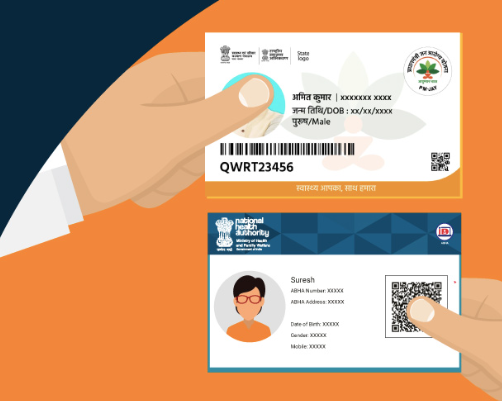
Once your ABHA ID has been successfully generated, the system will present an option to download your abha card in a digital format, typically as a PDF or an image file containing your ABHA number, ABHA address, QR code, and basic profile details. Download this file and save it in a location you can easily access, your phone’s gallery or files app, a cloud storage service, or printed as a physical backup. The QR code on the card can be scanned by healthcare providers for quick identification and consent-based access to your linked health records.
Step 6: Link Your Existing Health Records Where Possible
After completing your abha card download, the next valuable step is linking any existing health records you can access digitally to your ABHA profile. Many empanelled hospitals and diagnostic centres now offer the option to link a patient’s visit records, prescriptions, and reports directly to their ABHA ID at the time of service, building up your digital health history over time.
How to Use Your ABHA Card at Hospitals
At hospitals that have integrated ABHA into their registration process, you can use either your ABHA number or your ABHA address to register for a visit, and in many cases scan your card’s QR code for faster check-in. The hospital can then request consent-based access to your existing linked health records, which can be particularly valuable in emergency situations or when consulting a specialist who needs visibility into your prior treatment history.
Privacy and Consent Controls
A core design principle of the ABHA system is that access to your linked health records always requires your explicit consent, healthcare providers cannot access your historical records simply because you have an ABHA ID, they must request access, and you must approve that request through the ABHA app or designated consent mechanism. This consent-based architecture is intended to give individuals meaningful control over who can view their sensitive health information.
Conclusion
As India’s digital health ecosystem continues to expand, more hospitals, diagnostic centres, healthcare providers, and insurers are integrating with the ABHA platform, making a digital health ID increasingly valuable for seamless medical record management and faster healthcare access. Keeping your ABHA card readily available can simplify hospital registrations, consultations, and insurance-related documentation. Alongside digital healthcare initiatives, trusted financial platforms such as Bajaj Finance help individuals access a wide range of health insurance solutions, enabling them to better prepare for both their healthcare and financial needs. Together, digital health records and comprehensive health insurance can contribute to a more convenient and secure healthcare experience.
